


Download Flock Team Communication App – Secure, Free, Cross‑Platform Collaboration Tool
Overview
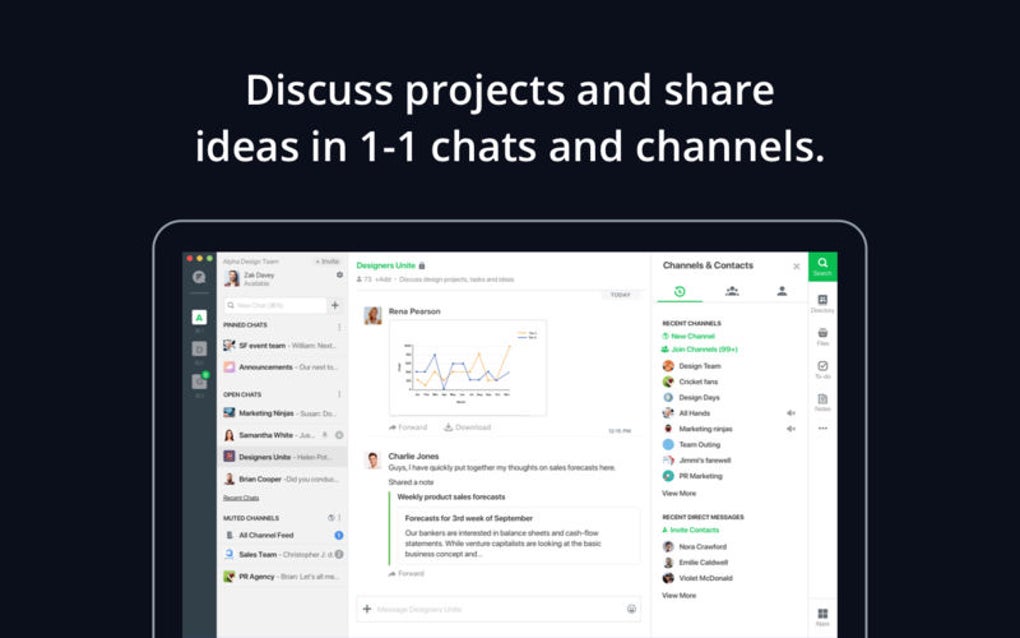
In today’s fast‑paced business environment, staying connected with teammates across locations is a non‑negotiable requirement. Flock answers that call by providing a robust, free team communication platform that rivals industry heavyweights such as Slack and HipChat. Designed for medium‑sized enterprises and growing startups, Flock blends real‑time chat, email‑style threading, and a suite of productivity integrations into a single, polished interface.
Companies like Tim Hortons have already adopted the app to streamline internal conversations, showing that the tool scales from small project groups to enterprise‑wide deployments.
At its core, Flock delivers one‑to‑one messaging, group channels, and threaded discussions that keep conversations organized. What truly sets it apart is the depth of its third‑party integrations: GitHub, Google Drive, Trello, and more can be connected directly inside the app, turning it into a mini‑hub for daily workflows.
The UI is clean, modern, and responsive, yet it can become cluttered when multiple large teams converge in a single workspace. Notification handling is functional but leans heavily on name‑based alerts, which may not satisfy power users who crave granular control. Threading across very large or distributed teams can feel a bit brittle, requiring users to adopt best‑practice naming conventions.
Overall, Flock is a solid, secure, and free alternative for organizations that need a feature‑rich communication suite without the premium price tag. If you’re willing to trade a few niche Slack features for a more open integration ecosystem, Flock could become the collaboration backbone of your company.
Core Features & Integration Capabilities
- Instant Messaging: One‑to‑one chats, group channels, and threaded conversations keep dialogue organized.
- File Sharing & Storage: Drag‑and‑drop files, share Google Drive links, and store documents within channels.
- Video & Audio Calls: Built‑in voice and video conferencing for up to 20 participants per call.
- Searchable History: Full‑text search across messages, files, and integrated apps.
- Third‑Party Integrations: Seamless connections to GitHub, Trello, Asana, Google Calendar, Zapier, and over 300 other services.
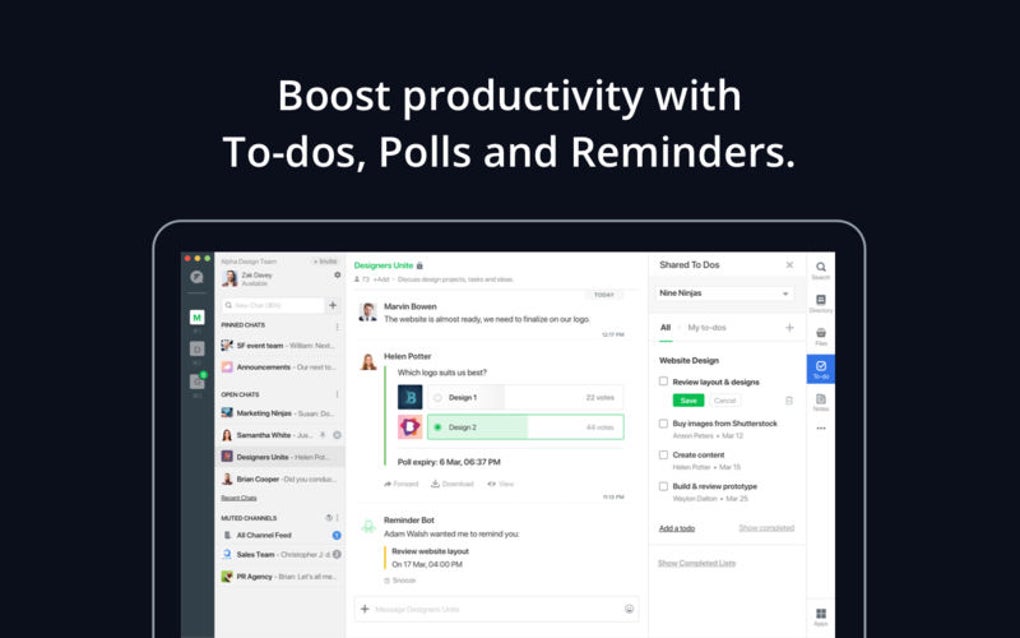
- Task Management: Create, assign, and track tasks directly from chat using the integrated “To‑Do” feature.
- Automation Bots: Deploy bots for reminders, polls, and workflow automation without leaving the app.
- Custom Emoji & Reactions: Personalize communication with a rich set of emojis and reaction options.
- Security & Compliance: End‑to‑end encryption, SSO via SAML, and GDPR‑compatible data handling.
- Mobile & Desktop Apps: Native clients for Windows, macOS, Linux, Android, and iOS ensure you stay connected on the go.
Why Integration Matters
Modern teams rarely work in isolation; they toggle between code repositories, project boards, and cloud storage. Flock’s integration layer eliminates the need to switch windows constantly. For example, a developer can receive a GitHub pull‑request notification inside a dedicated “Dev‑Ops” channel, click a button to view the diff, and discuss changes without leaving the conversation. Similarly, a marketing team can attach a Trello card directly to a brainstorming thread, turning ideas into actionable items instantly. This level of contextual awareness accelerates decision‑making and reduces the friction that typically plagues multi‑tool environments.
Installation, Setup, and Compatibility
Getting started with Flock is straightforward and requires only a few minutes of your time. The app is available as a free download for Windows, macOS, Linux, Android, and iOS, ensuring that every team member can join from their preferred device. Follow these steps to install and configure the platform:
- Download the Installer: Visit the official Flock website and click the “Download” button for your operating system. Windows users receive an
.exefile, macOS users get a.dmg, and Linux users can choose a.debor.rpmpackage. - Run the Installer: Follow the on‑screen prompts. The installer automatically adds a desktop shortcut and registers the protocol handler for
flock://links. - Create an Account: Launch the app and sign up with your work email. You can also sign in using Google Workspace or Microsoft Azure AD for SSO.
- Set Up Teams & Channels: After logging in, click “Create Team,” give it a name (e.g., “Product Development”), and invite colleagues by email or by sharing an invite link.
- Connect Integrations: Navigate to Settings → Integrations. Search for the services you use (GitHub, Drive, Trello, etc.) and follow the OAuth flow to grant access.
- Configure Notifications: Under Settings → Notifications, choose how you want to be alerted – desktop pop‑ups, email digests, or mobile push. While name‑based alerts are the default, you can enable “Keyword Alerts” for critical terms.
- Test the Workflow: Send a test message, attach a file, and start a video call to ensure everything works as expected.
Flock supports the following operating systems: Windows 10/11, macOS 10.15 and later, major Linux distributions (Ubuntu, Fedora, Debian), Android 6.0 and later, and iOS 13 and later. The cloud‑based backend means that all data syncs in real time, so switching between devices is seamless.
For organizations that require additional security, Flock offers an enterprise tier with custom domain verification, data residency options, and API‑level controls. However, the free tier already provides end‑to‑end encryption and compliance with major privacy regulations, making it suitable for most small‑to‑mid‑size teams.
Pros & Cons
Pros
- Free tier includes unlimited messaging, video calls, and most integrations.
- Rich integration ecosystem (GitHub, Google Drive, Trello, Zapier, etc.).
- Cross‑platform availability ensures consistent experience on desktop and mobile.
- Intuitive UI with customizable themes and emoji support.
- Strong security features: end‑to‑end encryption, SSO, and GDPR compliance.
Cons
- Notification system lacks granular filtering beyond name‑based alerts.
- Threading can become unwieldy in very large or distributed teams.
- Interface may feel cluttered when many channels and integrations are active simultaneously.
- Limited native analytics compared to premium Slack plans.
- Enterprise features (custom branding, advanced admin controls) require a paid upgrade.
Frequently Asked Questions
Is Flock free for unlimited users?
Yes, the core Flock package is completely free and supports unlimited users, messages, and file storage. Premium features such as advanced analytics, custom branding, and enhanced admin controls are available in paid plans.
Can I integrate Flock with my existing GitHub repositories?
Absolutely. Flock offers a native GitHub integration that lets you receive pull‑request notifications, commit alerts, and issue updates directly within a channel. You can also trigger custom bots to automate workflows.
How secure is the data stored in Flock?
Flock encrypts data both at rest and in transit using industry‑standard TLS 1.3. It also supports Single Sign‑On (SSO) via SAML, two‑factor authentication, and complies with GDPR and CCPA regulations.
Does Flock work offline?
The desktop and mobile apps cache recent messages, allowing you to read previous conversations while offline. However, sending new messages or uploading files requires an active internet connection.
What platforms can I install Flock on?
Flock provides native clients for Windows 10/11, macOS 10.15 and later, Linux (Ubuntu, Fedora, Debian), Android 6.0 and newer, and iOS 13 and newer. A web version is also available for any modern browser.
Conclusion & Call to Action
If your organization is searching for a cost‑effective, secure, and feature‑rich collaboration platform, Flock deserves serious consideration. Its extensive integration catalog, intuitive design, and cross‑platform support give teams the flexibility to communicate without compromising productivity. While the notification system and large‑team threading could use refinement, these are relatively minor trade‑offs compared with the overall value offered in the free tier.
Ready to bring your team together on a single, unified workspace? Download Flock now and start a 30‑day free trial of the premium features to see how the app can accelerate your workflows. Experience secure, real‑time collaboration that scales from a handful of members to an enterprise‑wide network—all without breaking the bank.
Overall Rating: 4.3 / 5
Pros: Free core plan, deep integrations, strong security, multi‑device sync.
Cons: Limited notification granularity, occasional UI clutter, basic analytics.







